Introduction:
When selecting a smart display for embedded systems, industrial HMIs, or automation projects, understanding the model number structure is just as important as knowing the screen size or resolution. Each DWIN display model code carries detailed information about its product line, colour depth, resolution, application grade, size, hardware version, temperature range, touch type, and memory configuration.
To simplify this process, DWIN follows a standardised naming convention for its Smart LCM (Liquid Crystal Module) product line. At first glance, a model number may appear complex—but once you understand the logic behind it, selecting the right display becomes fast and error-free.
In this blog, we will decode the DWIN display model numbering system step by step, starting with a real-world example:
DMG80480T070_15WTR
By breaking down this model code, you will learn how to:
Identify the product line and display type
Understand color depth and resolution
Select the right screen size and application grade
Recognize touch panel options and temperature ratings
Differentiate between hardware versions and memory configurations
This structured approach will help engineers, designers, and buyers confidently choose the most suitable DWIN Smart UART LCD module for their application—without confusion or guesswork.
1. Product Line Code – DM (DWIN Smart LCM Product Line)
In the DWIN model numbering system, the first two characters identify the product line. For the model DMG80480T070_15WTRIOT, the prefix “DM” represents the DWIN Smart LCM (Liquid Crystal Module) product line.
DMG80480T070_15WTRIOT
The DM series is designed for intelligent human–machine interface (HMI) applications, where display control, UI rendering, and communication are handled directly by the module. These displays typically integrate:
A built-in GUI engine
UART serial communication (TTL level)
Onboard flash memory for UI resources
Support for DWIN’s DGUS/DGUS II development environment
2. Color Code – T / G (Display Color Depth)
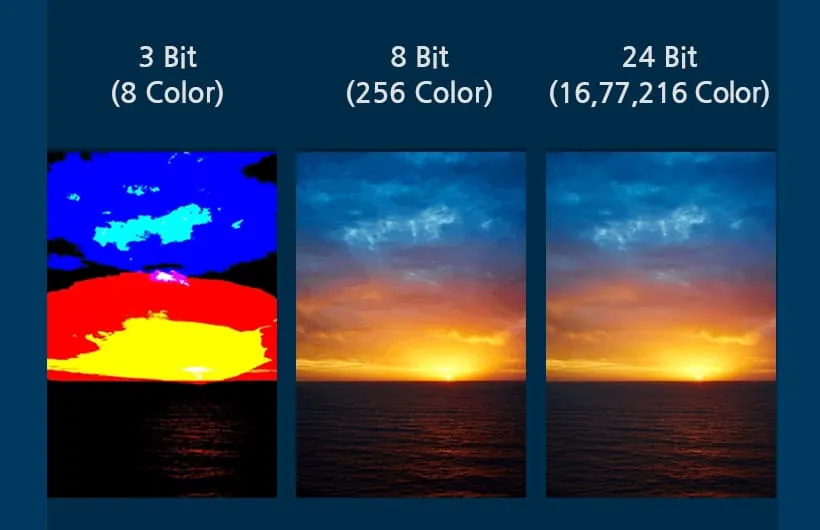
In the DWIN Smart LCM model number, the color code is represented by one character placed immediately after the product line code. This character defines the color depth of the display, which directly affects image quality, color smoothness, and overall user interface appearance.
For example, in the model DMG80480T070_15WTRIOT, the letter “G” indicates a high color-depth display.
DMG80480T070_15WTR
Color Code Definitions
| Color Code | Color Depth | Description |
|---|---|---|
| T | 65K colors (16-bit) | Suitable for basic graphics, icons, and text-based user interfaces |
| G | 16.7M / 262K colors (18-bit / 24-bit) | Ideal for rich graphics, gradients, photos, and modern UI designs |
T – 65K Color (16-bit)
Uses RGB565 color format
Lower memory and bandwidth requirements
Cost-effective solution
Best for industrial HMIs, simple control panels, and data displays
G – 16.7M / 262K Color (18-bit / 24-bit)
Supports high-quality images and smooth gradients
Better visual clarity and realism
Recommended for consumer electronics, medical displays, and advanced graphical interfaces
How to Choose the Right Color Code
Choose T (65K color) if your application focuses on stability, readability, and cost efficiency
Choose G (16.7M color) if your project requires a premium user experience and detailed graphics
3. Resolution Code (5 Digits)
In the DWIN Smart LCM model number, the resolution is represented by a 5-digit numeric code. This code directly specifies the horizontal × vertical pixel resolution of the display, determining how much information and graphical detail can be shown on the screen.
DMG80480T070_15WTR
For example, in DMG80480T070_15WTRIOT, the code 80480 means the display resolution is 800 × 480 pixels.
Common DWIN Resolution Codes
| Resolution Code | Pixel Resolution |
|---|---|
| 24240 | 240 × 240 |
| 32240 | 320 × 240 |
| 48270 | 480 × 272 |
| 48320 | 480 × 320 |
| 64360 | 640 × 360 |
| 64480 | 640 × 480 |
| 80480 | 800 × 480 |
| 85480 | 854 × 480 |
| 80600 | 800 × 600 |
| 10600 | 1024 × 600 |
| 10768 | 1024 × 768 |
| 12480 | 1280 × 480 |
| 12720 | 1280 × 720 |
| 12800 | 1280 × 800 |
| 13768 | 1364 × 768 / 1366 × 768 |
| 19108 | 1920 × 1080 |
| 19480 | 1920 × 480 |
Why Resolution Matters
Lower resolutions are ideal for simple text, icons, and status displays
Medium resolutions provide a balance between clarity and performance
High resolutions enable detailed graphics, images, and advanced HMI layouts
Choosing the correct resolution ensures:
Clear readability
Smooth UI performance
Optimal memory usage
Visual Comparison of Common LCD Resolutions
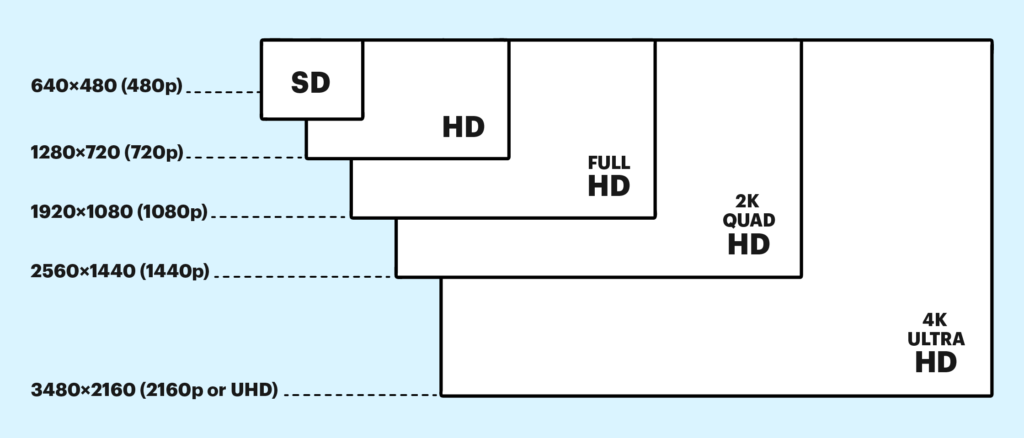
Selection Tip
For industrial control panels, resolutions like 480×272 or 800×480 are widely used
For advanced graphical interfaces, 1024×600 or higher resolutions are recommended
4. Classification Code
(1 Character)
In the DWIN Smart LCM model number, the classification code is a single character that defines the application grade, reliability level, environmental tolerance, and performance standard of the display. This is one of the most critical parameters when selecting a display for long-term and mission-critical use.
DMG80480T070_15WTR
Classification Code Overview
| Code | Grade | Typical Application |
|---|---|---|
| F | COF Structure | Ultra-thin / special structure |
| Y | Beauty Grade | High appearance, consumer UI |
| L | Simple Application Grade | Basic consumer electronics |
| C | Commercial Grade | Commercial equipment |
| T | Industrial Grade | Industrial control & automation |
| K | Medical Grade | Medical and healthcare devices |
| S | Harsh Environment Grade | Outdoor / high-brightness |
| Q | Automotive Grade | Vehicle and transportation |
Below is a detailed explanation of each major grade, including brightness, backlight life, and environmental capability.
Industrial Grade (T)
Industrial-grade displays are designed for 24/7 operation, long service life, and stable performance in demanding environments.
Key Specifications:
Backlight Service Life: > 30,000 hours
Bright
300 nit
Brightness Control:
100-level adjustment
Typical Applications:
Industrial HMI panels
Automation systems
Control cabinets
Factory equipment
Harsh Environment Grade (S)
This grade is specifically designed for outdoor use, strong ambient light, and extreme conditions.
Key Specifications:
Backlight Service Life: > 50,000 hours
(Brightness decays to 50% under continuous max-brightness operation)
High Brightness:
1000 nit
800 nit
Brightness Control:
0–100 levels
Typical Applications:
Outdoor control terminals
Charging stations
Marine equipment
Sunlight-readable HMIs
Simple / Consumer Grade (L)
Consumer-grade displays focus on cost efficiency and are suitable for non-critical, indoor applications.
Key Specifications:
Backlight Service Life: > 10,000 hours
Brightness:
200 nit
Brightness Control:
0–100 levels
Typical Applications:
Home appliances
Smart devices
Consumer electronics
Commercial Grade (C)
Commercial-grade displays offer a balance between performance and cost, suitable for semi-industrial environments.
Key Specifications:
Brightness: 250 / 300 nit
LED Lifetime: > 20,000 hours
Conformal Coating: None
Typical Applications:
Commercial kiosks
POS systems
Building automation
Display terminals
Medical Grade (K)
Medical-grade displays are engineered for high reliability, safety, and protection in healthcare environments.
Key Feature:
Conformal Coating Applied
Benefits of Conformal Coating:
Protection against moisture, dust, and chemical corrosion
Increased long-term stability
Suitable for medical and laboratory environments
Typical Applications:
Medical monitoring devices
Diagnostic equipment
Healthcare control panels
5. Screen Size Code (3 Digits)
In the DWIN Smart LCM model number, the screen size is represented by a 3-digit numeric code. This code indicates the diagonal size of the display in inches, helping users quickly identify the physical dimensions of the module.
For example, in the model DMG80480T070_15WTRIOT, the code 070 means the display size is 7.0 inches.
DMG80480T070_15WTR
Common Screen Size Codes
| Size Code | Display Size |
|---|---|
| 020 | 2.2 inch |
| 024 | 2.4 inch |
| 028 | 2.8 inch |
| 030 | 3.0 inch |
| 035 | 3.5 inch |
| 040 | 4.0 inch |
| 041 | 4.1 inch |
| 043 | 4.3 inch |
| 050 | 5.0 inch |
| 056 | 5.6 inch |
| 070 | 7.0 inch |
| 080 | 8.0 inch |
| 088 | 8.8 inch |
| 097 | 9.7 inch |
| 101 | 10.1 inch |
| 104 | 10.4 inch |
| 116 | 11.6 inch |
| 121 | 12.1 inch |
| 140 | 14.0 inch |
| 150 | 15.0 inch |
| 156 | 15.6 inch |
| 173 | 17.3 inch |
| 185 | 18.5 inch |
| 215 | 21.5 inch |
Why Screen Size Matters
Choosing the right screen size is essential for:
- User experience (readability and interaction)
- Available installation space
- Application requirements
General Selection Guide:
- 2.2″ – 3.5″ → Compact devices, handheld systems
- 4.0″ – 7.0″ → Home appliances, control panels (most commonly used)
- 8.0″ and above → Industrial HMIs, dashboards, kiosks
Visual Reference of Different Screen Sizes
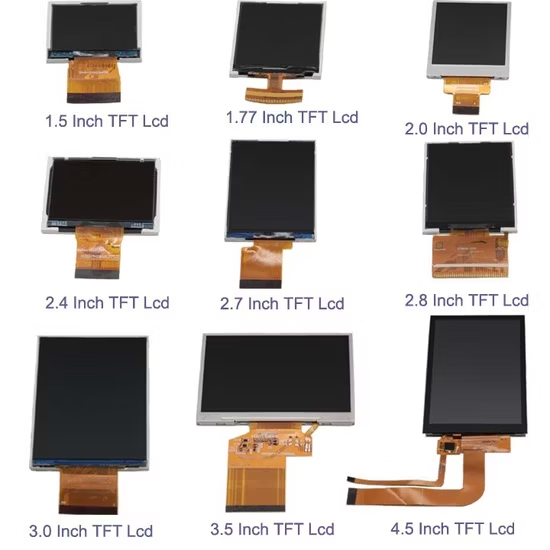
Selection Tip
- If your application involves touch interaction, avoid very small sizes
- For data-heavy interfaces, choose larger displays (≥7 inch)
- Always consider the active display area, not just diagonal size
6. Attribute Code and Hardware Serial Number (2 Digit / Character)
In the DWIN Smart LCM model number, the attribute code is a single digit or character that defines the core platform, system architecture, or functional capability of the display module.
This code helps you understand what kind of processing platform or software environment the display is based on.
For example, in DMG80480T070_15WTRIOT, the attribute code is part of “_15”, where:
- 1 → Attribute Code
- 5 → Hardware version
DMG80480T070_15WTR
Attribute Code Definitions
| Code | Meaning | Description |
|---|---|---|
| 0 | Basic Type | Standard display without advanced platform features |
| 1 | Basic Type with Shell | Includes enclosure for easy installation |
| 2 | Analog Video Platform | Supports analog video processing |
| 3 | Android Platform | Runs Android OS for advanced applications |
| 4 | Digital Video Platform | Supports digital video input |
| A | DGUS II Kernel | Smart UART-based GUI system (most common) |
Visual Representation of Different Platforms
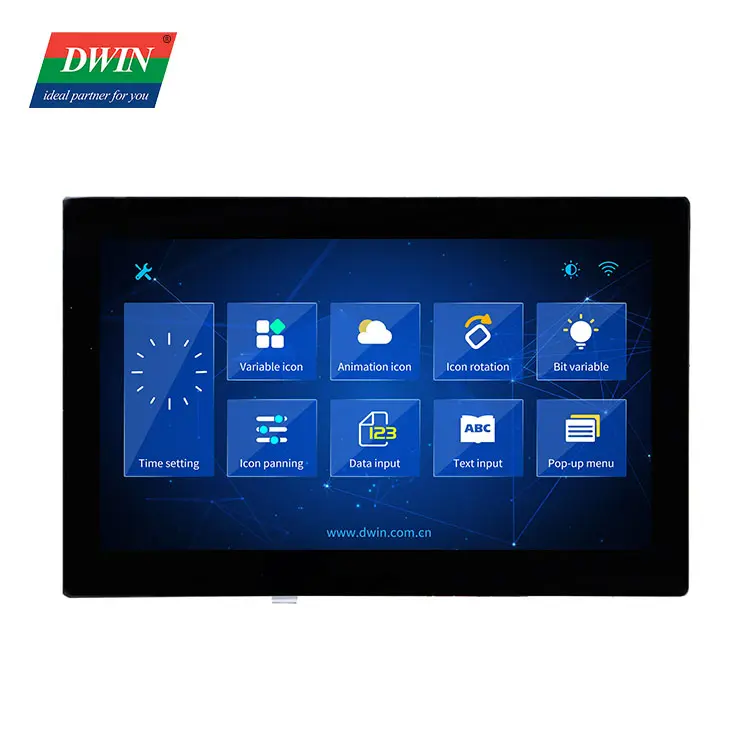
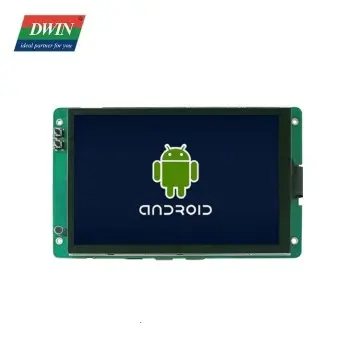
UART-based communication Display Andriod Display
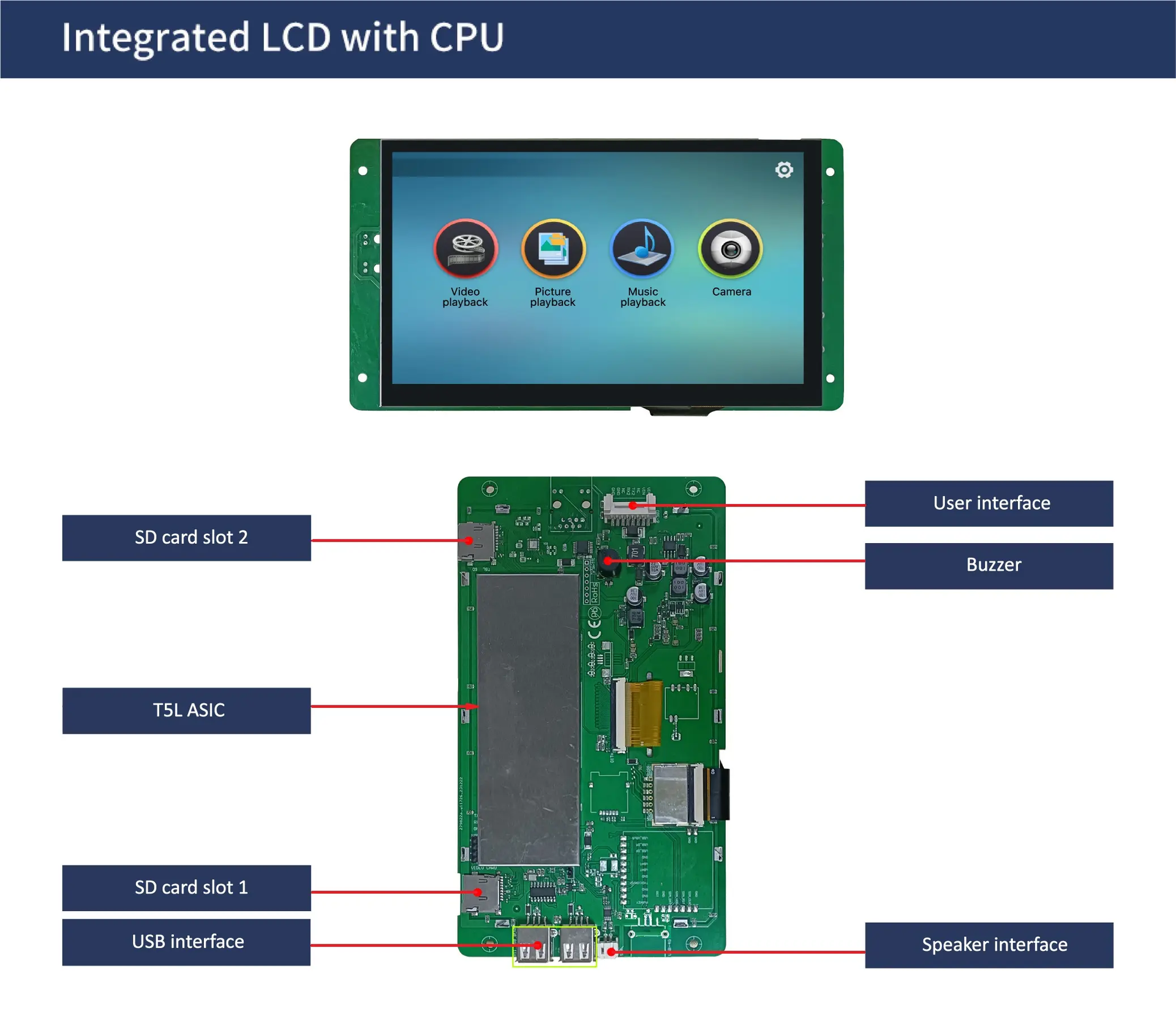
Digital video processing Screen
Most Common: DGUS II Platform (A)
The DGUS II kernel is the most widely used platform in DWIN smart displays.
Key Features:
- UART-based communication (TTL level)
- Drag-and-drop UI development using DGUS software
- No need for complex embedded programming
- Fast development and deployment
Best For:
- Industrial HMIs
- Embedded systems
- IoT interfaces
Basic Type (0 / 1)
- Suitable for simple display applications
- Minimal processing capability
- Code 1 includes a protective shell/enclosure
Android Platform (3)
- Runs a full Android operating system
- Supports apps, multimedia, and advanced UI
- Requires higher power and system resources
Applications:
- Smart panels
- Advanced HMI systems
- Multimedia interfaces
Video Processing Platforms (2 / 4)
- Designed for video input and display applications
Used in:
- Monitoring systems
- Camera displays
- Multimedia devices
Why Attribute Code Matters
Choosing the right attribute code ensures:
- Compatibility with your software environment
- Proper performance level
- Reduced development time
⚠ Important Tip:
If you are using UART communication with microcontrollers, the DGUS II (A) platform is usually the best choice.
7. LCD Temperature Level (1 Character)
In the DWIN Smart LCM model number, the LCD temperature level is represented by a single character. This code defines the operating temperature range of the display, ensuring it performs reliably under specific environmental conditions.
For example, in DMG80480T070_15WTRIOT, the letter “W” indicates a wide temperature range, suitable for industrial environments.
DMG80480T070_15WTR
Temperature Code Definitions
| Code | Temperature Type | Description |
|---|---|---|
| N | Normal Temperature | Suitable for indoor and controlled environments |
| W | Wide Temperature | Designed for industrial and harsh environments |
Normal Temperature (N)
Typical Range:
- 0°C to 50°C (approx.)
Characteristics:
- Cost-effective
- Suitable for stable indoor environments
- Not ideal for extreme heat or cold
Applications:
- Home appliances
- Consumer electronics
- Indoor control panels
Wide Temperature (W)
Typical Range:
- -20°C to +70°C (Industrial)
- -40°C to +85°C(Harsh Environment)
Characteristics:
- Reliable in extreme environments
- Stable performance in temperature fluctuations
- Common in industrial-grade displays
Applications:
- Industrial automation
- Outdoor equipment
- Automotive and energy systems
Why Temperature Level Matters
Choosing the wrong temperature grade can lead to:
- Display malfunction in extreme conditions
- Reduced lifespan
- Visibility issues (slow response in cold, fading in heat)
Selection Tip
- Use N (Normal) for indoor, stable environments
- Use W (Wide) for industrial, outdoor, or fluctuating temperatures
8. Touch Panel Category (2
Characters)
In the DWIN Smart LCM model number, the touch panel category is represented by one or two characters. This code defines the type of touch technology used in the display, which directly impacts usability, durability, and user experience.
For example, in DMG80480T070_15WTRIOT, the code “TR” indicates a Resistive Touch Panel.
DMG80480T070_15WTR
Touch Panel Codes
| Code | Touch Type | Description |
|---|---|---|
| N | No Touch | Display-only module |
| TR | Resistive Touch | Pressure-based touch |
| TC | Capacitive Touch | Modern touch (like smartphones) |
N – Without Touch Panel
Features:
- No touch functionality
- Requires external input (buttons, keypad, encoder)
- Lowest cost option
Applications:
- Monitoring systems
- Display-only dashboards
- Industrial readouts
TR – Resistive Touch Panel
Features:
- Pressure-sensitive (works with finger, gloves, stylus)
- Reliable in industrial environments
- Lower cost compared to capacitive
- Slightly less smooth touch experience
Advantages:
- Works in dusty, wet, or harsh conditions
- High accuracy for control applications
Applications:
- Industrial HMIs
- Factory control panels
- Medical equipment
TC – Capacitive Touch Panel
Features:
- Touch-sensitive (like smartphones)
- Supports multi-touch gestures
- Smooth and responsive UI
- Premium user experience
Limitations:
- May not work with gloves (unless specially designed)
- Higher cost
Applications:
- Consumer electronics
- Smart home interfaces
- Modern UI-based systems
How to Choose the Right Touch Type
- Choose N (No Touch) → If input is handled externally
- Choose TR (Resistive) → For industrial, rugged, glove-based use
- Choose TC (Capacitive) → For modern UI and better user experience
Visual Comparison of Touch Technologies

Selection Tip
- For industrial projects, TR (Resistive) is the safest and most reliable choice
- For premium products, go with TC (Capacitive)
- Always consider user environment (gloves, moisture, dust)